Shadows in Canvas
The CanvasRenderingContext2D object provides several properties to manipulate the shadow of shapes.
index.html
<canvas id=”canvas”></canvas>
Note: The basic structure of an HTML file has been omitted for brevity.
index.js
- shadowColor
By default, the value is set to fully-transparent black. But we can modify it by adding a different CSS colour.
To visualise the shadow we need to set one of the following properties as well (initially their values are set to 0).
- shadowOffsetX
The offset of the shadow horizontally.
- shadowOffsetY
The offset of the shadow vertically.
- shadowBlur
It specifies how much blur should be applied.
const canvas = document.getElementById("canvas")
const context = canvas.getContext("2d")

context.shadowColor = "hsl(0 100% 50%)"
context.shadowOffsetX = -10
context.shadowOffsetY = -10
context.shadowBlur = 10

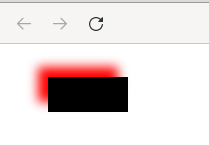
context.fillRect(40, 25, 80, 35)
The result is a blurred red shadow applied to the black rectangle.
Challenge
- Modify the opacity of the fillStyle property and see how this affects the opacity of the shadow too.